
Unified Color Branding
The unified Color branding for both the Real Estate Review (RER) and Competitive Market Analysis (CMA) has replaced the previous color scheme. Colors are set in the Agent Branding tab of the Account dialog. There are two color fields:
Primary Color — the dominant brand color (default: #346F91 blue)
Accent Color — a secondary color for sub-headers and active tabs. If left unset, the app automatically derives one by lightening the primary color by 25%
You can pick colors manually or choose from preset brokerage brands (Keller Williams, RE/MAX, Coldwell Banker, etc.).
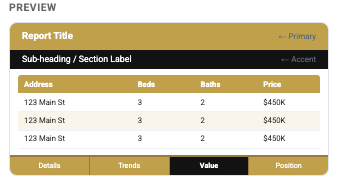
Sample showing the Century 21 “preset” color scheme.
CMA — Which Areas Get Which Color
Top banner (tall, ~60pt) → primaryColor
Sub-banner (narrower, ~35pt, shows page title) → accentColor (or auto-derived)
Bottom nav bar with 5 tabs:
Inactive tabs → primaryColor
Active/current tab → accentColor (or auto-derived)
Separator line between tabs → darkened primary
Table headers → primaryColor
Alternating table rows → very lightly tinted primary
RER — Which Areas Get Which Color
Cover page (Banner):
Large address block in the middle → primaryColor
"REAL ESTATE REVIEW REPORT" label strip at bottom → accentColor
Area Sales Trend page (uses primaryColor + fontColor directly, not the theme):
Top header bar → primaryColor
Market stats label backgrounds → primaryColor
Footer bar → primaryColor
Header/footer text → fontColor (default white)
Realtor footer (appears on all pages):
Footer background → primaryColor
Footer text (name, email, phone) → white
FontColor — the Third Color
There's a third field, fontColor (default white #FFFFFF), which controls text color on colored backgrounds. It's editable via the older Edit Realtor Info screen, but not currently exposed in the main Agent Branding tab's color pickers. In practice, it should almost always stay white unless your primaryColor is very light. Future release will allow the user to change the font color and select from a set of fonts.
